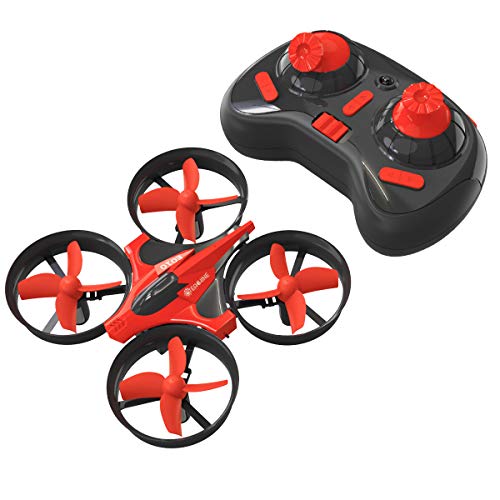

EACHINE Mini Drones for Kids,E010 2.4GHz 6-Axis Gyro Remote Control Best Quadcopter Nano Drone for Adults Beginners - Headless Mode, 3D Flip, One Key Return (Red)
Sold Out / Out of Stock
This item may be available in a different size, colour, scent, version or platform:
EACHINE Mini Drones for Kids,E010 2.4GHz 6-Axis Gyro Remote Control Best Quadcopter Nano Drone for Adults Beginners - Headless Mode, 3D Flip, One Key Return (Red)
✈【Good Gift for Beginners】:Red represents enthusiasm and joy, let it be a surprise for Beginners in the festival.
✈【One-key Return】:With built-in positioning system,just press the one key return button, the drone will fly back to the remote control's location.
✈【3D flip and High low speed mode】:The drone can perform 3D rollover performance, free to switch between high and low speed modes, have more fun.
✈【Compass Mode】:The drone will change its flight direction with the change of the direction of remote control.
✈【Easy to Use】:1.Turn on the quadcopter then turn on the controller; 2. Push the throttle(left lever) to the top , and then pull it down; 3. When you hear a "Beep", which means the connection was set up successfully, and then you can start to fly your drone.
Function: up / down / left turn / right turn / forward / back / left side fly / right side fly / speed file/ 360° flip/ a key return / headless mode / memory function
Commen Problem and The Solution: 1. Quadcopter lost connection to controller: Pull two function lever to bottom left for 3 seconds, then pull two function lever to bottom right for 3 second. Then try to mach code again(Follow Bullet points 4 ); 2. Quadcopter can't lift up: Check the propeller to make sure it was installed correctly(diagonal propellers must be the same direction ); 3. Motor not spin: Check the motor to see if anything stuck the motor(hair, string, etc) 4. Package comes without spare part: Please feel free to contat us first via Amazon .com or amazon@eachine.com.